ภาพรวม
ผู้ขายที่ขายอยู่บน Wix อยู่แล้วสามารถเชื่อมต่อไซต์ Wix ของตนกับตลาดผ่าน Vendor Konnect เมื่อต่อเชื่อมแล้ว ผลิตภัณฑ์บนไซต์ Wix นั้นจะพร้อมให้เห็นในแดชบอร์ดผู้ขาย และพร้อมที่จะถูกแมพไปยังตลาด การเชื่อมต่อทั้งหมดใช้เวลาเพียงประมาณหนึ่งนาที คู่มือนี้สำหรับผู้ขายในตลาดที่ขับเคลื่อนด้วย Shipturtle ซึ่งผลิตภัณฑ์ของพวกเขาอยู่บนไซต์ Wix ผู้ดูแลตลาดสามารถทำตามขั้นตอนเดียวกันเมื่อทำงานภายในแดชบอร์ดของผู้ขาย
ในคู่มือนี้ คุณจะได้เรียนรู้วิธีการ:
- เปิด Vendor Konnect และเริ่มการเชื่อมต่อกับ Wix ค่ะ
- ยืนยันรหัสผ่านของคุณและเพิ่มแอป Multi Vendor konnect ลงในเว็บไซต์ Wix ของคุณ
- เลือกเว็บไซต์ Wix ที่ถูกต้องเพื่อเชื่อมต่อ。
- ตรวจสอบว่าการเชื่อมต่อสำเร็จแล้วและดูผลิตภัณฑ์ของคุณที่อยู่ใต้ Unmapped.
1. ก่อนที่คุณจะเริ่ม
เตรียมสิ่งต่อไปนี้ให้พร้อม:
- ข้อมูลการเข้าสู่ระบบของแดชบอร์ดผู้ขายของคุณและรหัสผ่าน คุณจะต้องป้อนรหัสผ่านอีกครั้งเพื่อยืนยันการเชื่อมต่อ
- เข้าถึงบัญชี Wix ที่เป็นเจ้าของเว็บไซต์ที่คุณต้องการเชื่อมต่อ
- ชื่อเว็บไซต์ Wix ที่จะเชื่อมต่อ หากบัญชี Wix ของคุณมีมากกว่าหนึ่งบัญชี
2. เปิด Vendor Konnect
จากแดชบอร์ดผู้ขายของคุณ:
- ขยายเมนูด้านข้าง۔
- คลิกผู้ขาย Konnect(ไอคอนลูกศรสองอัน, ด้านบน)การตั้งค่า).
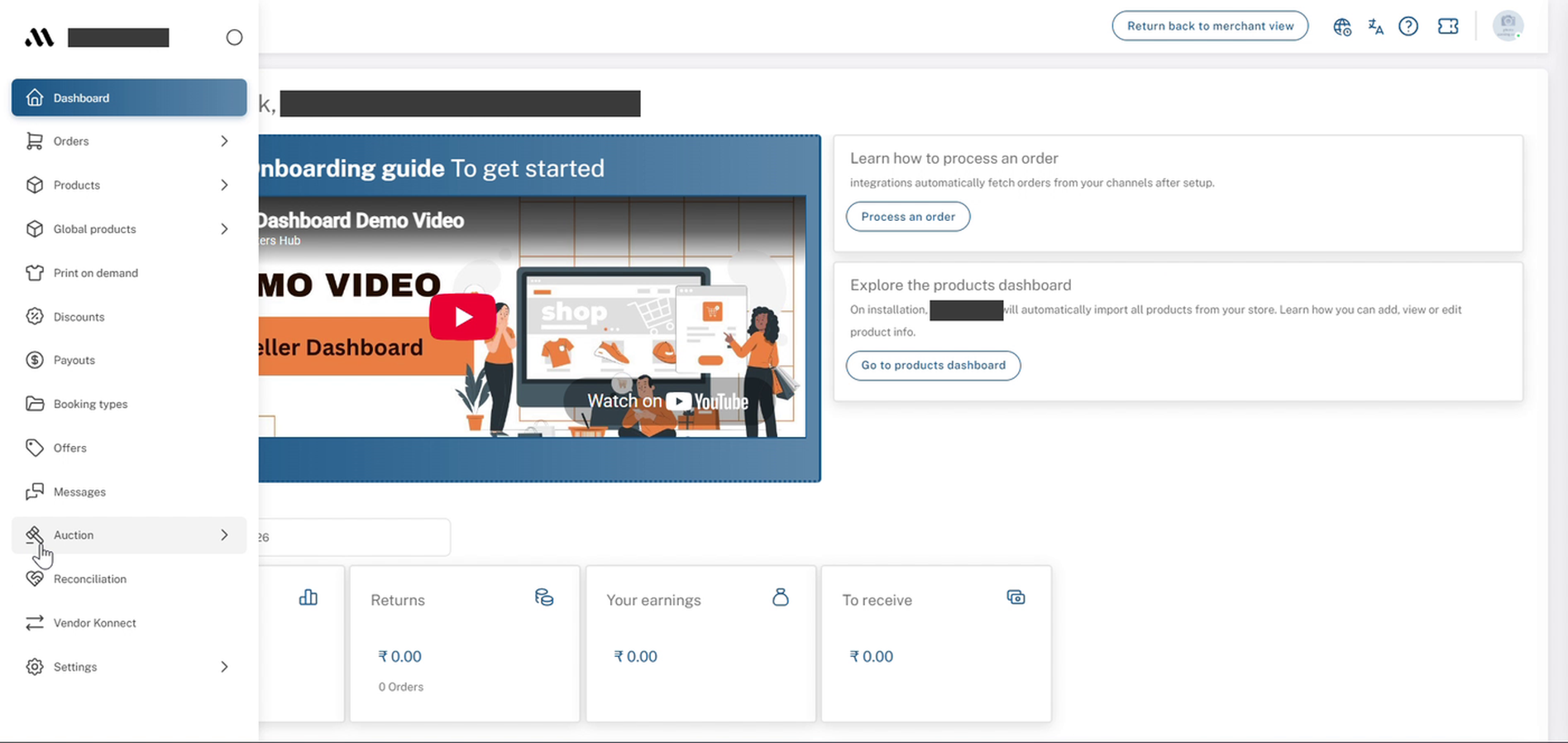
แดชบอร์ดผู้ขาย: ขยายเมนูด้านข้างพร้อมกับ Vendor Konnect
3. คลิกที่เชื่อมต่อบนการ์ด Wix
Theช่องทางที่เชื่อมต่อหน้าเปิดอยู่ใต้เชื่อมต่อร้านค้า, รายการทุกช่องทางที่รองรับ หากยังไม่มีการเชื่อมโยงใด ๆ คุณจะเห็นไม่มีร้านค้าเชื่อมต่ออยู่ที่มุมขวาบน
- ค้นหา{{variable}}Wixการ์ดในแถวที่สอง
- คลิกเชื่อมต่อใต้Wix.
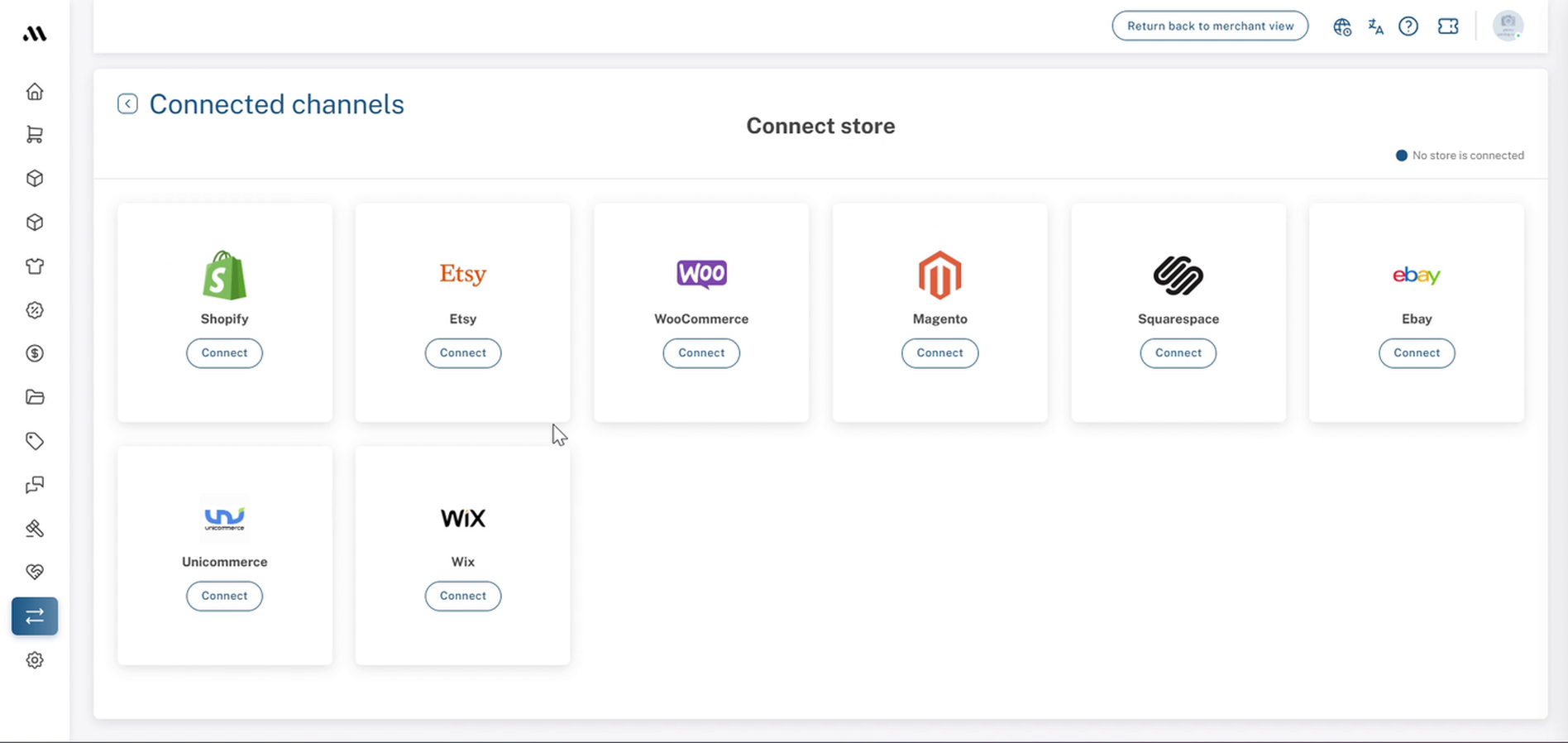
Vendor Konnect → ช่องทางที่เชื่อมต่อ: เชื่อมต่อหน้าร้านกับการ์ด Wix
4. ยืนยันรหัสผ่านของคุณ
Aยืนยันรหัสผ่านหน้าต่างปรากฏขึ้นพร้อมข้อความว่า "คุณต้องยืนยันรหัสผ่านของคุณเพื่อทำการนี้ให้เสร็จสิ้น。"
- กรุณาใส่รหัสผ่านแดชบอร์ดผู้ขายของคุณ。
- คลิกยืนยัน.
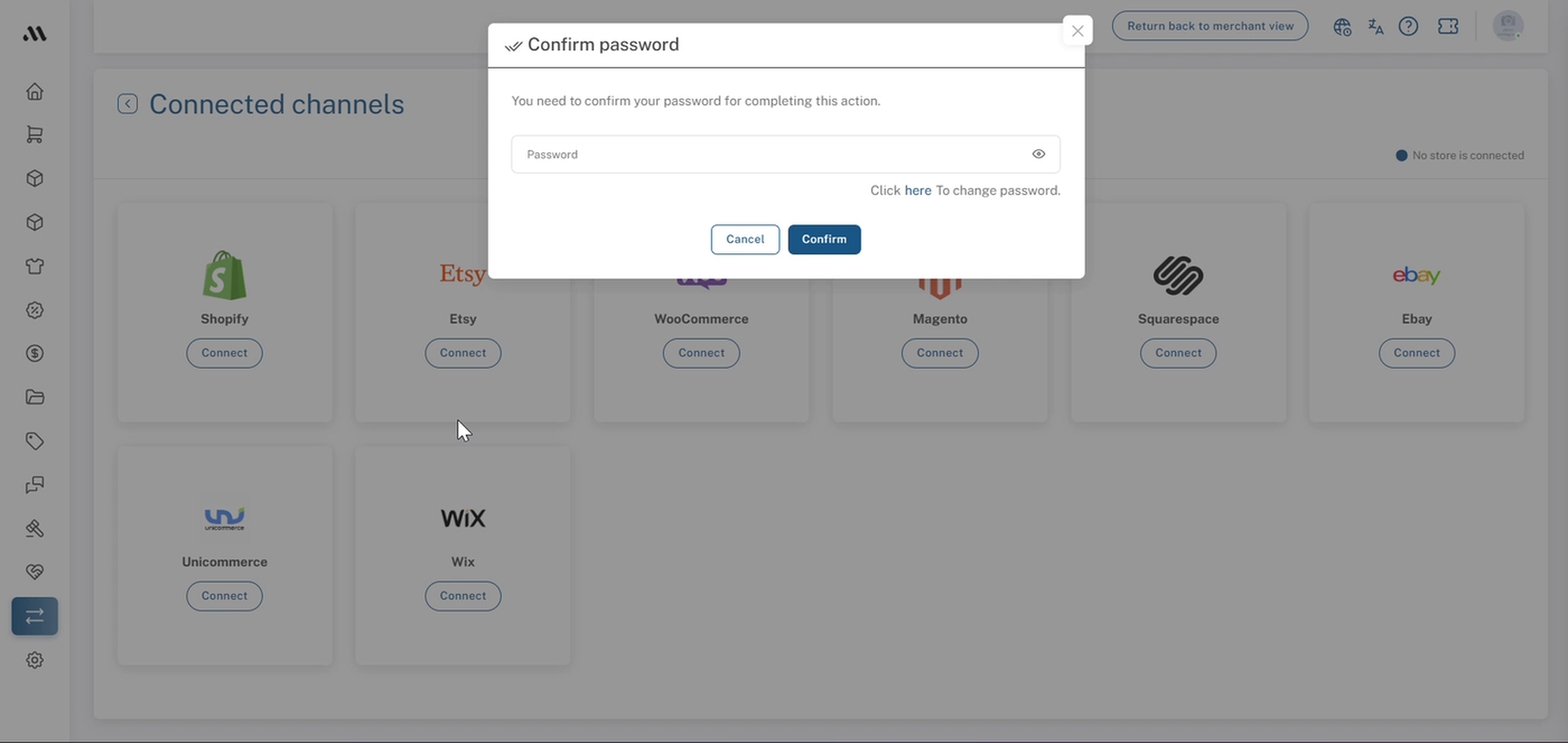
ช่องทางที่เชื่อมต่อ: หน้าต่างยืนยันรหัสผ่าน
5. เพิ่มแอปลงในเว็บไซต์ Wix ของคุณ
คุณถูกนำไปที่มัลติ เวนเดอร์ โคนเนคต์หน้าแอปบน Wix (โดย Multi Vendor Konnect, ทำเครื่องหมาย)ฟรี). หากคุณยังไม่ได้เข้าสู่ระบบ Wix ในเบราว์เซอร์นี้ Wix จะขอให้คุณเข้าสู่ระบบก่อน ใช้บัญชีที่เป็นเจ้าของเว็บไซต์ที่คุณต้องการเชื่อมต่อ
- คลิกเพิ่มไปยังเว็บไซต์.
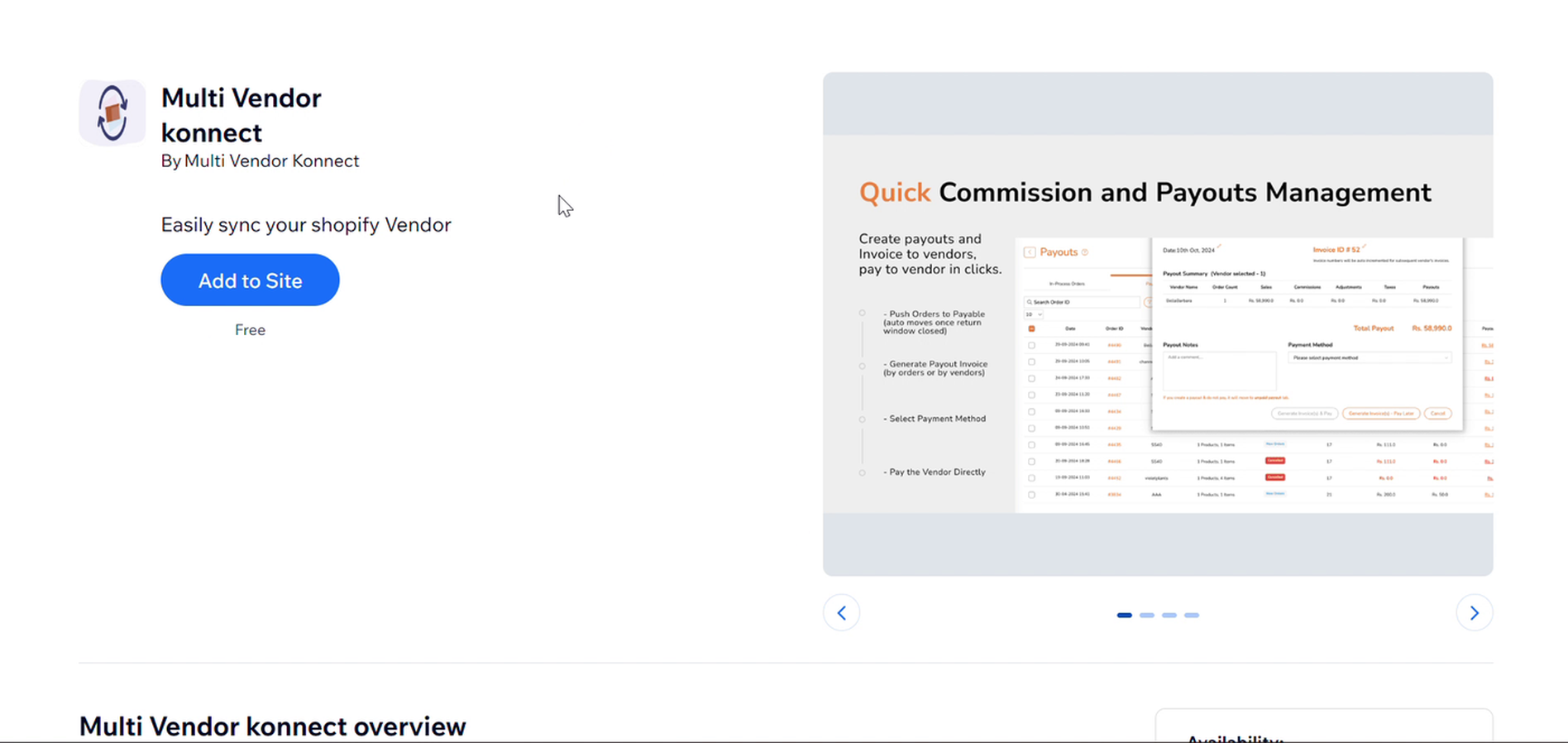
Wix: รายการแอป Multi Vendor konnect พร้อมปุ่ม เพิ่มในเว็บไซต์
6. เลือกเว็บไซต์ที่จะเชื่อมต่อ
ในเลือกไซต์ที่จะเพิ่มแอปนี้ไปยังคุณเลือกเว็บไซต์ Wix ที่คุณต้องการนำผลิตภัณฑ์ไปยังตลาด。
- เลือกเว็บไซต์ Wix ที่จะเชื่อมต่อ ใช้ค้นหา...ถ้าคุณมีหลายไซต์
- คลิกดำเนินการต่อมันจะถูกทำให้เป็นสีเทาจนกว่าจะมีการเลือกไซต์ใดไซต์หนึ่ง
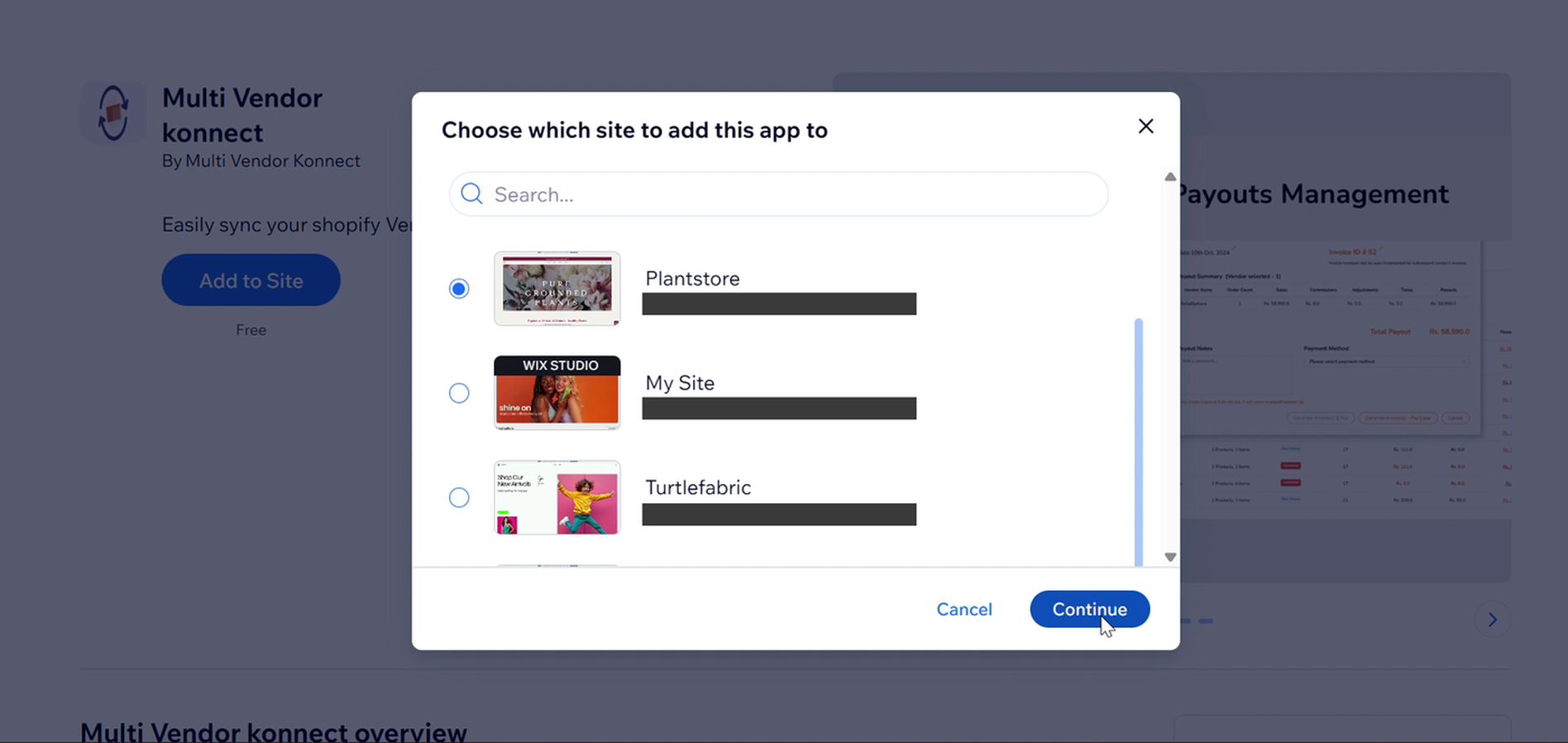
Wix: เลือกเว็บไซต์ที่จะแอดแอปนี้ไป โดยคลิกปุ่ม Continue
7. กรุณารอสักครู่ในขณะที่ Wix เชื่อมต่อ
คุณจะกลับไปที่แดชบอร์ดของคุณพร้อมกับ{{variable}}การเชื่อมต่อ wixข้อความ: "กรุณารอ อย่ารีเฟรชหรือออกจากหน้านี้..."
- เก็บแท็บนี้ไว้เปิดจนกว่า{{variable}}Vendor konnectโหลดหน้าเพจ.
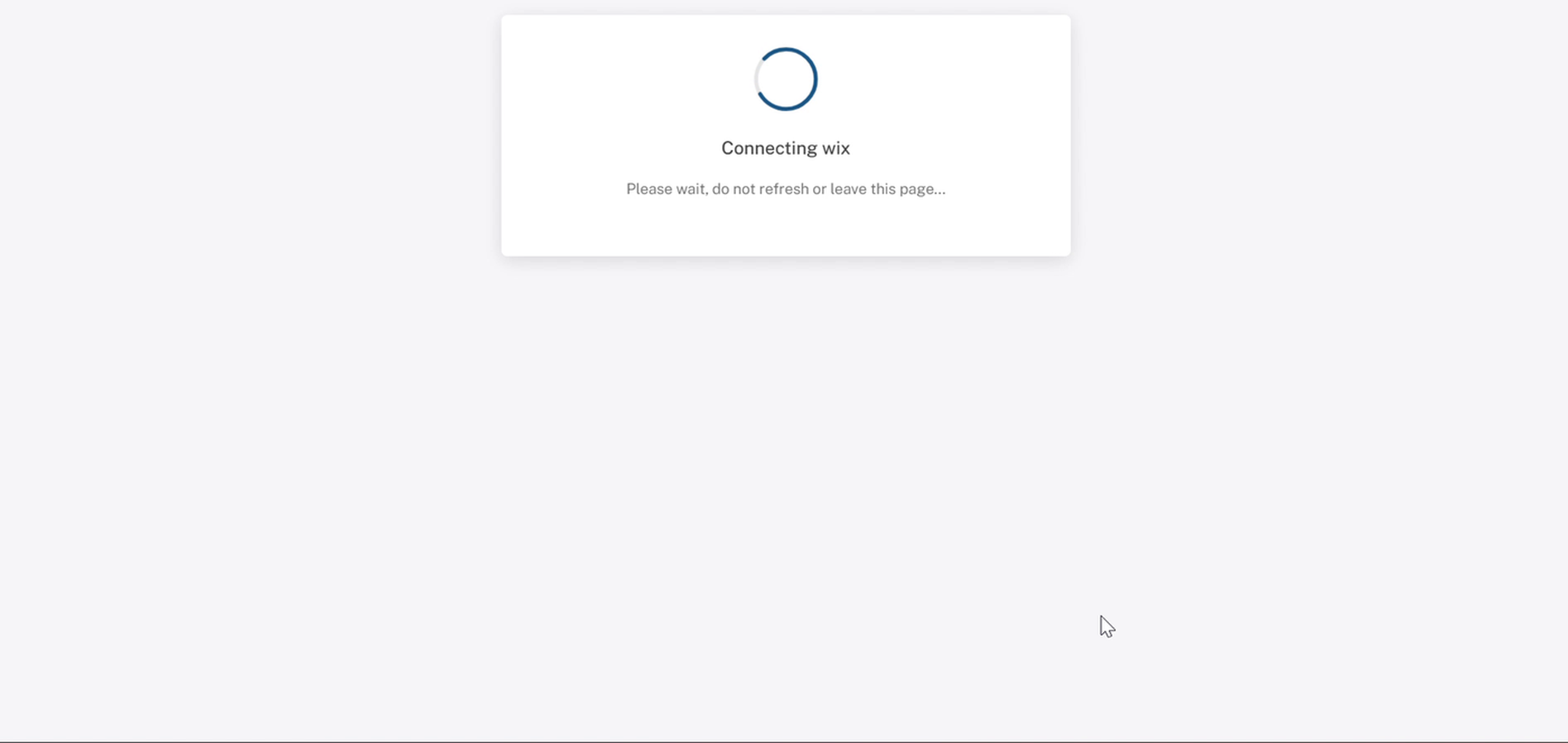
แดชบอร์ด: กำลังเชื่อมต่อข้อความวิกซ์ โปรดอย่ากดรีเฟรชหรือปิดแท็บ
8. ตรวจสอบการเชื่อมต่อ
TheVendor konnectหน้าปัจจุบันจะแสดงเว็บไซต์ Wix ของคุณที่{{variable}}โดเมนID ที่มีสีเขียวเชื่อมต่อแล้วป้ายและ aตัดการเชื่อมต่อร้านค้าปุ่ม ด้านล่างคุณจะเห็นร้านค้าที่เลือก, ข้อมูล {count}ผลิตภัณฑ์ที่มีอยู่จำนวนที่ดึงมาจาก Wix และ aสถานะการใช้งานของ webhook ผู้ขายปุ่ม.
แท็บที่แมพและไม่ได้แมพ
ผลิตภัณฑ์ของคุณถูกแบ่งออกเป็นสองแท็บ:ถูกแมพแล้วและไม่ได้แแมพ. หลังจากเชื่อมต่อ ทุกอย่างอยู่ภายใต้ไม่ถูกทำแผนที่เปิดแท็บนั้นเพื่อดูสถานะของแต่ละผลิตภัณฑ์, จำนวน/ตัวแปร,ซิงค์ล่าสุดเวลา, และสถานะการแมพพ์.
การจับคู่ผลิตภัณฑ์กับตลาดครอบคลุมในเพิ่มและสร้างแผนที่สินค้า.
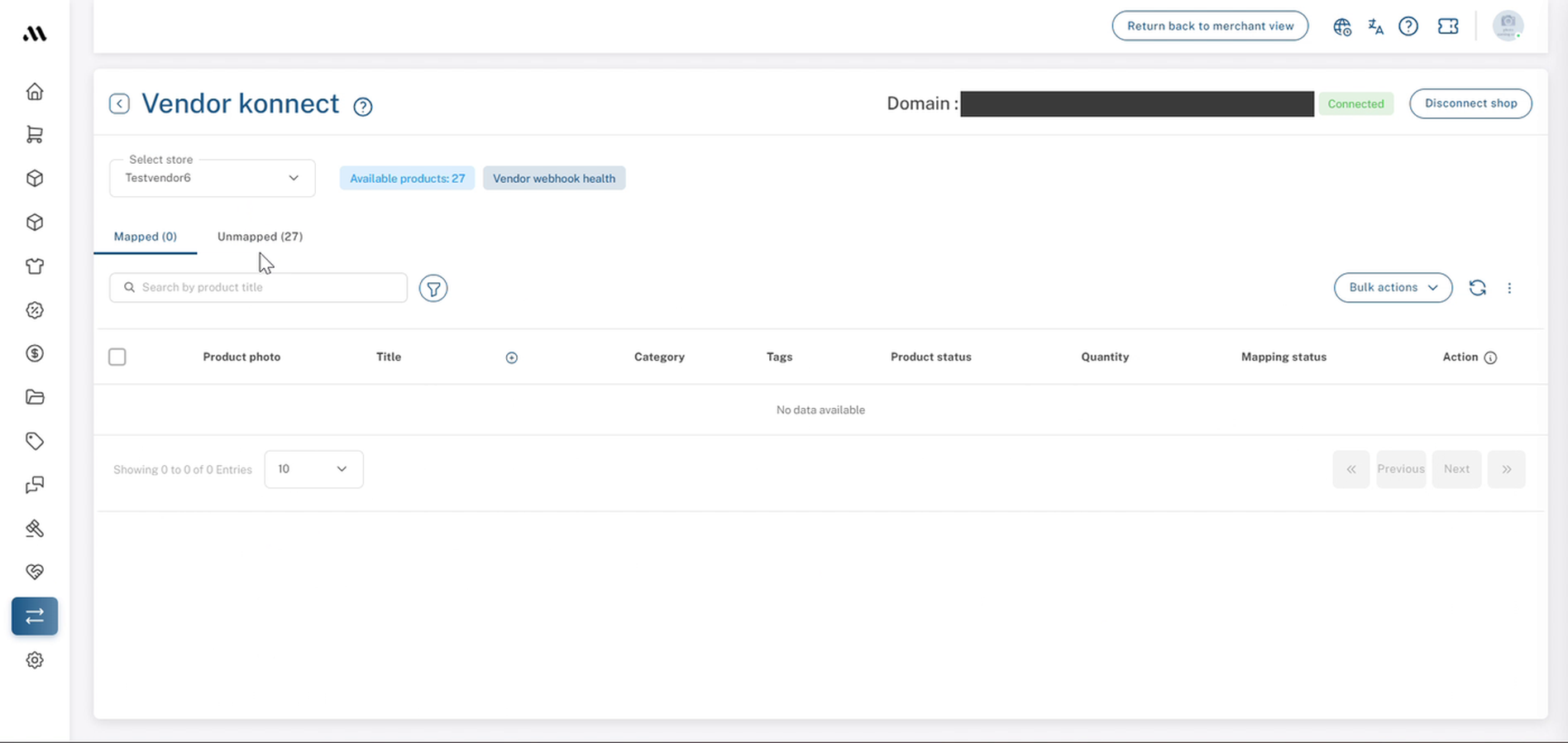
Vendor konnect: การเชื่อมต่อ Wix ที่ประสบความสำเร็จพร้อมกับป้ายเชื่อมต่อ
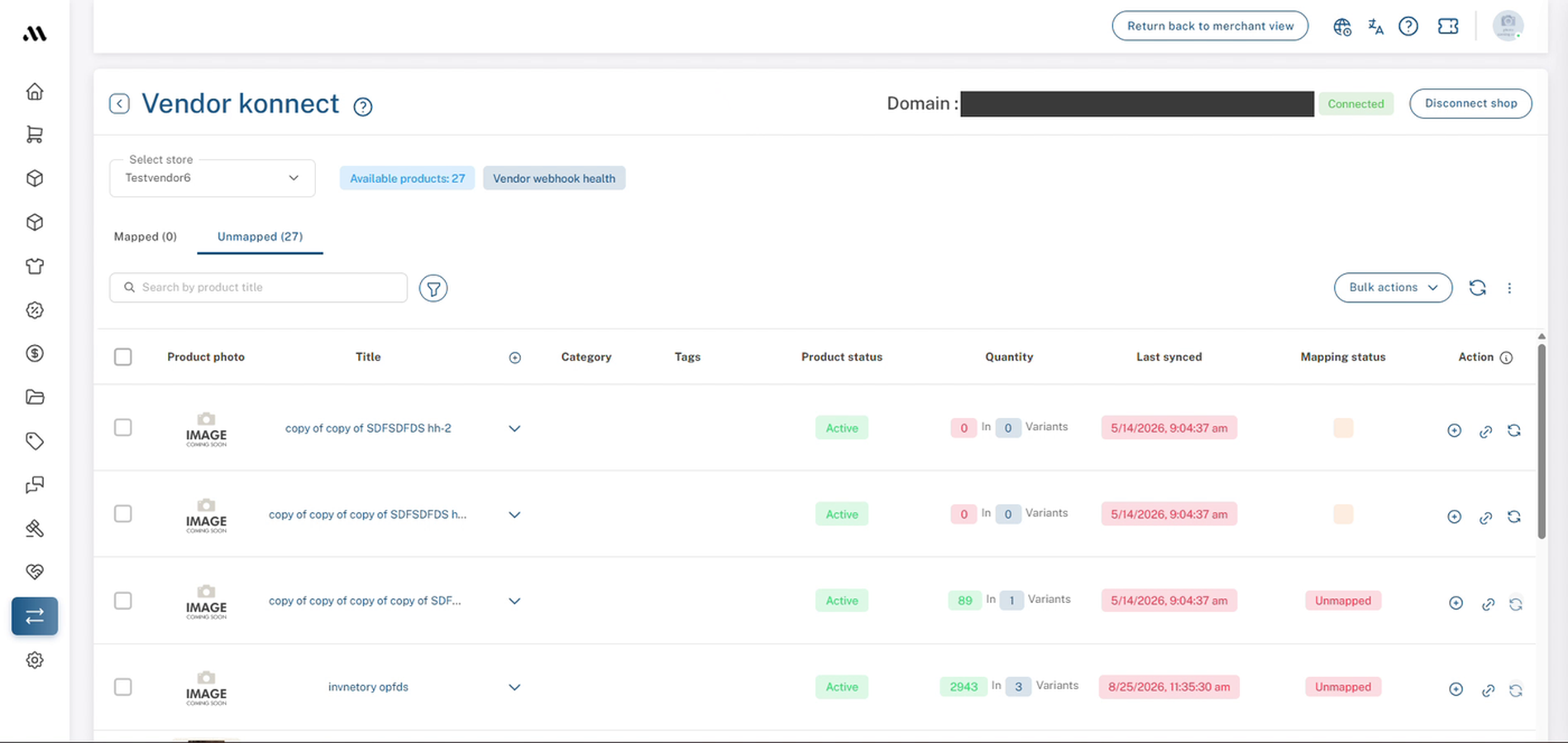
Vendor konnect → แท็บ Unmapped หลังจากการเชื่อมต่อใหม่
9. เช็คลิสต์การเชื่อมต่อ
ก่อนที่คุณจะดำเนินการต่อ โปรดยืนยันว่าคุณได้:
- เปิดแล้วผู้ขาย Konnect.
- คลิกแล้วเชื่อมต่อบน Wix.
- ยืนยันรหัสผ่านแดชบอร์ดของคุณแล้ว
- คลิกแล้วเพิ่มไปยังเว็บไซต์ใน Wix.
- เลือกเว็บไซต์ Wix ที่ถูกต้องแล้ว.
- เห็นสีเขียวเชื่อมต่อแล้วแบดจ์.
- ตรวจสอบว่า {{variable}}ผลิตภัณฑ์ที่มีอยู่{count} ตรงกับแคตาล็อก Wix ของคุณ。
- พบสินค้าของคุณที่ระบุไว้ภายใต้ไม่ได้จัดทำแผนที่.
10. ขั้นตอนถัดไปที่แนะนำ
ตรวจสอบว่า {{variable}}ผลิตภัณฑ์ที่มีจำหน่าย{count} ตรงกับจำนวนผลิตภัณฑ์บนไซต์ Wix ของคุณ จากนั้นทำแผนที่ผลิตภัณฑ์ของคุณเพื่อให้แสดงอยู่ในตลาด.
สำหรับข้อมูลเพิ่มเติม ดูที่เพิ่มและทำแผนที่ผลิตภัณฑ์
คำถามที่พบบ่อย & การแก้ปัญหา
ทำไมฉันถึงต้องกรอกรหัสผ่านอีกครั้ง?
การเชื่อมต่อร้านค้าจะทำให้ตลาดสามารถเข้าถึงแคตตาล็อกผลิตภัณฑ์ของคุณได้ ดังนั้นแดชบอร์ดจึงขอให้คุณยืนยันว่าคุณเป็นตัวจริงก่อนที่จะเริ่มการเชื่อมต่อ
แอป Wix มีค่าใช้จ่ายหรือไม่?
แอป Multi Vendor konnect มีรายการดังนี้ฟรีบน Wix.
ผู้ดูแลตลาดสามารถเชื่อมต่อ Wix แทนผู้ขายได้หรือไม่?
ใช่ค่ะ ผู้ดูแลระบบที่ทำงานภายในแผงควบคุมของผู้ขาย (คุณจะเห็นกลับไปที่มุมมองของผู้ค้าที่ด้านบน) สามารถทำตามขั้นตอนเดียวกันได้ ตราบใดที่พวกเขามีรหัสผ่านแดชบอร์ดและการเข้าถึงบัญชี Wix ของผู้ขาย
ทำไมผลิตภัณฑ์ของฉันทั้งหมดถึงอยู่ในหมวด Unmapped?
นั่นคือสิ่งที่คาดหวังได้หลังจากเชื่อมต่อ ผลิตภัณฑ์ได้ถูกนำเข้ามาจาก Wix แต่ยังไม่ได้ถูกเชื่อมโยงกับตลาดสักที เมื่อพวกมันถูกเชื่อมโยงแล้ว พวกมันจะย้ายไปยังแผนที่แท็บ.
คุณจะตัดการเชื่อมต่อเว็บไซต์ Wix ของคุณได้อย่างไร?
ใช้ {{variable}}ตัดการเชื่อมต่อร้านค้าปุ่มที่มุมขวาบนของเวนเดอร์ คอนเน็คท์หน้า.
"Continue" ถูกปิดใช้งานใน Wix
กรุณาเลือกหนึ่งในไซต์ของคุณจากรายการก่อน.ต่อไปจะคลิกได้ก็ต่อเมื่อเลือกเว็บไซต์เสร็จแล้วเท่านั้น
ฉันไม่รู้รหัสผ่านแดชบอร์ดของฉัน
ใช้คลิกที่นี่เพื่อเปลี่ยนรหัสผ่านลิงก์ใน {the}ยืนยันรหัสผ่านหน้าต่าง, รีเซ็ตมัน, แล้วเริ่มใหม่จากขั้นตอนที่ 3.
หน้าติดอยู่ที่ "กำลังเชื่อมต่อกับ wix"
รอสักครู่ และอย่าทำการรีเฟรชหรือออกจากหน้าในขณะเชื่อมต่อ หากยังไม่เสร็จสิ้น ให้กลับไปที่ {{variable}}ผู้ค้าคอนเน็คเทอร์และตรวจสอบว่าแผงหรือหน้าของ Wix แสดงผลอยู่หรือไม่เชื่อมต่อแล้ว. ถ้ายังไม่เชื่อมต่อ ให้ทำตามขั้นตอนตั้งแต่ขั้นตอนที่ 3 และติดต่อฝ่ายสนับสนุนหากปัญหายังคงมีอยู่
ฉันเชื่อมต่อกับเว็บไซต์ Wix ที่ผิด
คลิกตัดการเชื่อมต่อร้านค้าบน {the}Vendor konnectหน้า จากนั้นเชื่อมต่ออีกครั้งและเลือกไซต์ที่ถูกต้องในขั้นตอนที่ 6
บทความที่เกี่ยวข้อง
- เพิ่มและทำแผนที่ผลิตภัณฑ์
- เชื่อมต่อร้านค้าผู้ขาย Shopify
- การเชื่อมต่อร้านค้าของผู้ขาย WooCommerce
- การแก้ไขปัญหาการซิงค์ผู้ขาย
ต้องการความช่วยเหลือไหม?
หากคุณติดขัด กรุณาติดต่อทีมสนับสนุน Shipturtle ที่team@shipturtle.comหรือยกเลิกตั๋วสนับสนุนผ่านหน้าสนับสนุนของ Shipturtle