19 June 2026
OrdersReleases
Shipturtle Product Releases
Latest updates, new features, and improvements across your multivendor marketplace platform.
⌘K
19 June 2026
ShippingAmazon Easy Ship Label Generation Fixed
Improved label generation reliability for Amazon Easy Ship shipments, ensuring a smoother shipping workflow.
19 June 2026
VendorsRomanian Language Support
The seller profile page on your store can now be displayed in Romanian, making it easier for Romanian-speaking customers to browse seller details in their preferred language.
19 June 2026
OrdersTax & Pricing Now Visible on Order Details Screen
Key tax and pricing information now appears directly on the "Order details" screen, so there's no more need to open the invoice PDF just to check a number.
19 June 2026
PayoutsCustom Invoice Upgrades
VAT numbers can now be included on custom invoice templates, and those same custom templates are now supported during bulk invoice generation .
19 June 2026
Smarter Review Messaging
When a customer tries to leave a product or vendor review on the merchant's storefront, they now get a clear, contextual message based on the order's status , for example, if the order hasn't been delivered yet, or if it was returned, the customer sees a message explaining why they can't review it yet.
19 June 2026
VendorsVendor Konnect: Inventory Sync Safeguard
Previously, users could still change the quantity on products mapped via the Vendor Konnect feature , through the UI or bulk import , even though it would eventually be overwritten by the next incoming sync from the vendor. This fix now entirely restricts any quantity update from Shipturtle on any mapped product, removing that inconsistency.
19 June 2026
OthersImproved Rental Booking Communication
Rental booking emails now automatically include booking start and end dates for clearer customer communication.
19 June 2026
ShippingShipping Rate Fallback Protection
This enhancement is relevant for users of the Shipping Profile and Third-Party Live Shipping Rate module. If a shipping provider's rate is temporarily unavailable, Shipturtle automatically applies a backup rate, protecting order fulfillment from stalling.
19 June 2026
OrdersDefault Handling of Zero-Value Orders
Orders totalling zero are now automatically marked as prepaid, even if your store originally tagged them as COD, cutting down manual reclassification work.
19 June 2026
PayoutsPayout Logs: Full Audit Trail for Every Payout Change
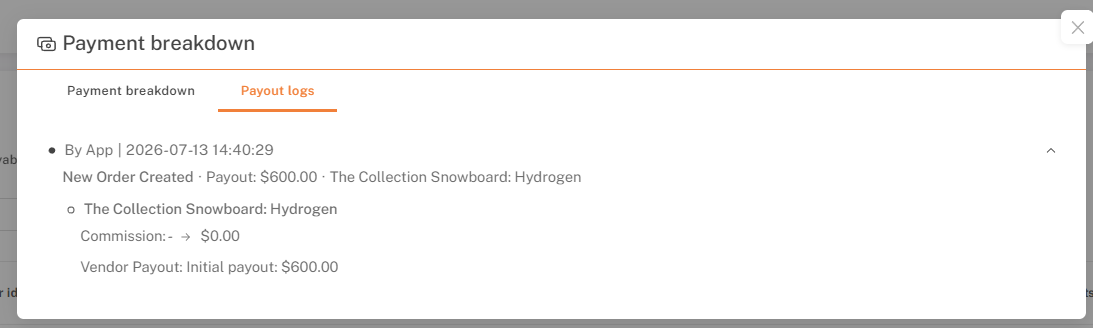
A new Payout Logs tab has been added in the Payment Breakdown popup, showing a full timeline of every payout change , who made it, when, and what changed.Alongside this, payout screens also show clearer payment status indicators and return-order visibility, for a more consistent experience overall.
19 June 2026
ProductsMore Flexible Global Product Management
Merchants can now edit a global product after it's been created. Vendors, in turn, can now see full product details in read-only mode while reviewing submissions — previously this information was hidden from them.
19 June 2026
OthersBigger Hyperlocal Delivery Zones
The zip-code limit per warehouse has jumped from 128 to a much larger 800, and previous delivery-area size restrictions have been removed entirely. Merchants can now support significantly larger hyperlocal delivery regions
19 June 2026
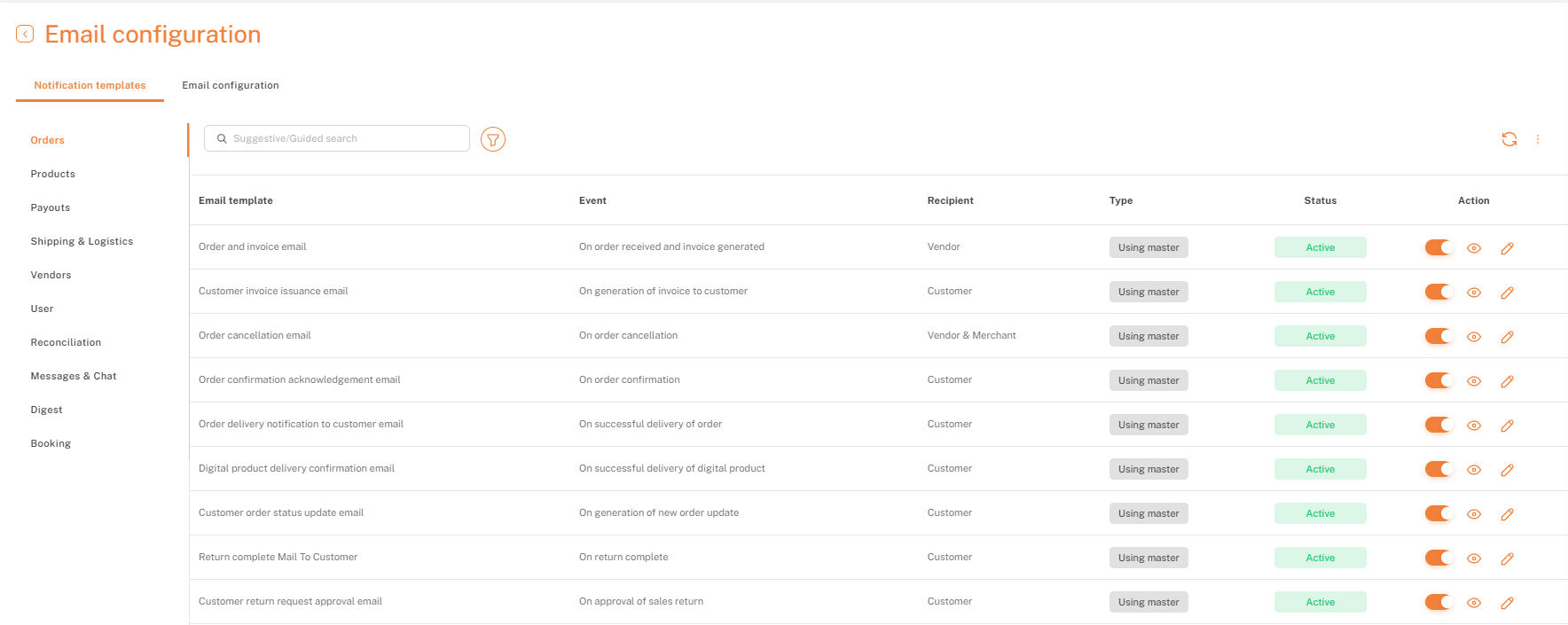
SettingsRefreshed Email Notifications Templates
Notification templates have moved to a dedicated, cleaner space in the left-pane navigation, making them easier to find and manage.
This update also adds a few new capabilities:
- Visibility into master template updates - merchants can see when a template has been updated at the system level.
- Test emails - preview exactly what recipients will see before going live.
- HTML validation before saving -templates are checked for formatting issues as part of the save process.
- Clearer, system-generated messages whenever an issue does come up.
Together, these give merchants more visibility and control over how their notification emails look and behave.
19 June 2026
VendorsPurchases Section in the C2C editor
Earlier, sellers on the C2C dashboard could only see orders placed with them, as a seller. Now, they can also see what they've ordered as a C2C customer, all in the same dashboard, making it easier to navigate between their buying and selling activity.

19 June 2026
VendorsBanner & Promotional Image Cropping
Merchants and vendors can now crop their banner and promotional images directly from the Company Details section of their profile, no need to resize or edit them externally before uploading. The crop tool shows the exact output dimensions in real time, so images fit their intended placement cleanly every time.
19 June 2026
VendorsVendor Tags and Segmentation
Merchants can now create a tag and add it to a particular vendor, making it easier to group and segment vendors. Tags can also be used to filter by vendor on the Orders, Vendors, and Payouts pages, with filtering on Products coming soon.
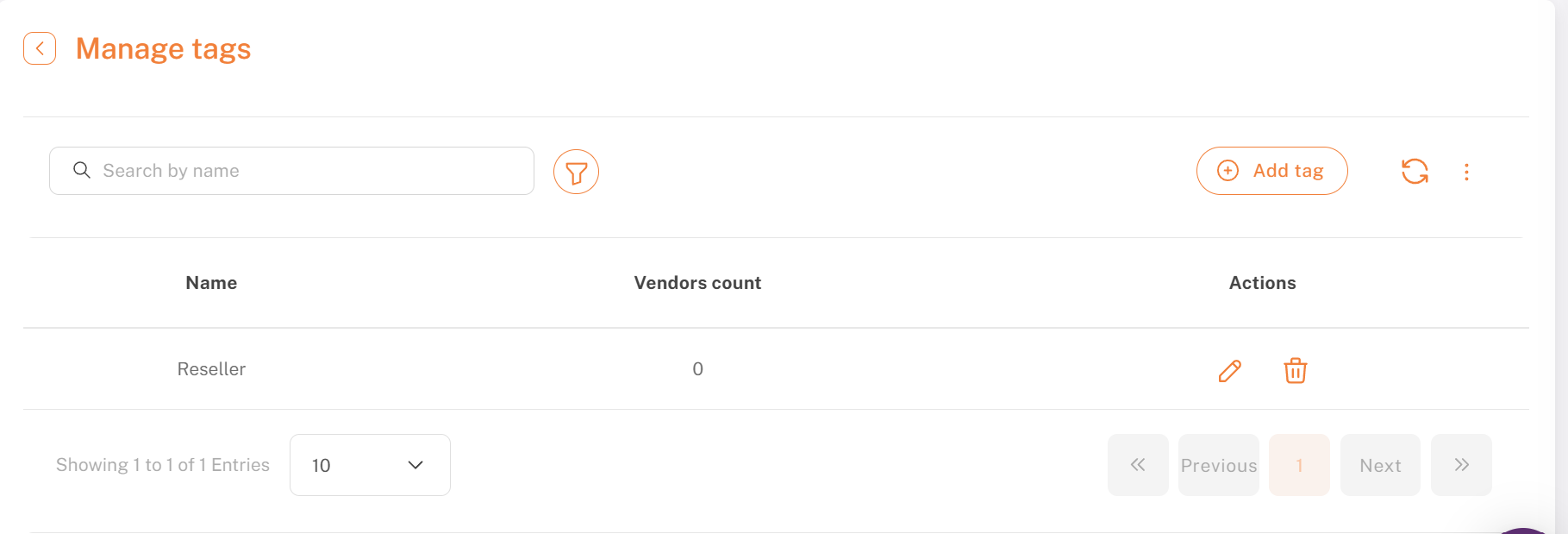
Create a vendor tag under Manage Tags
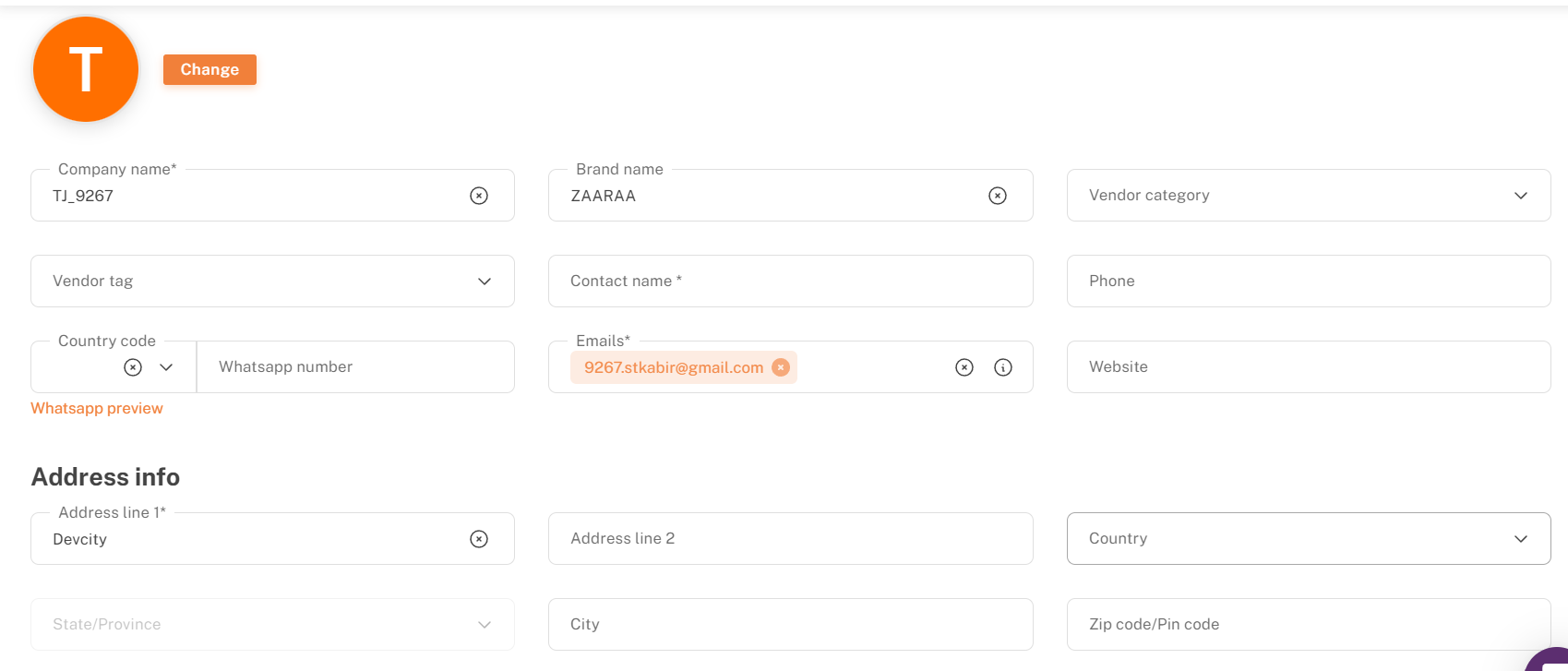
Assign the tag to a vendor from their profile
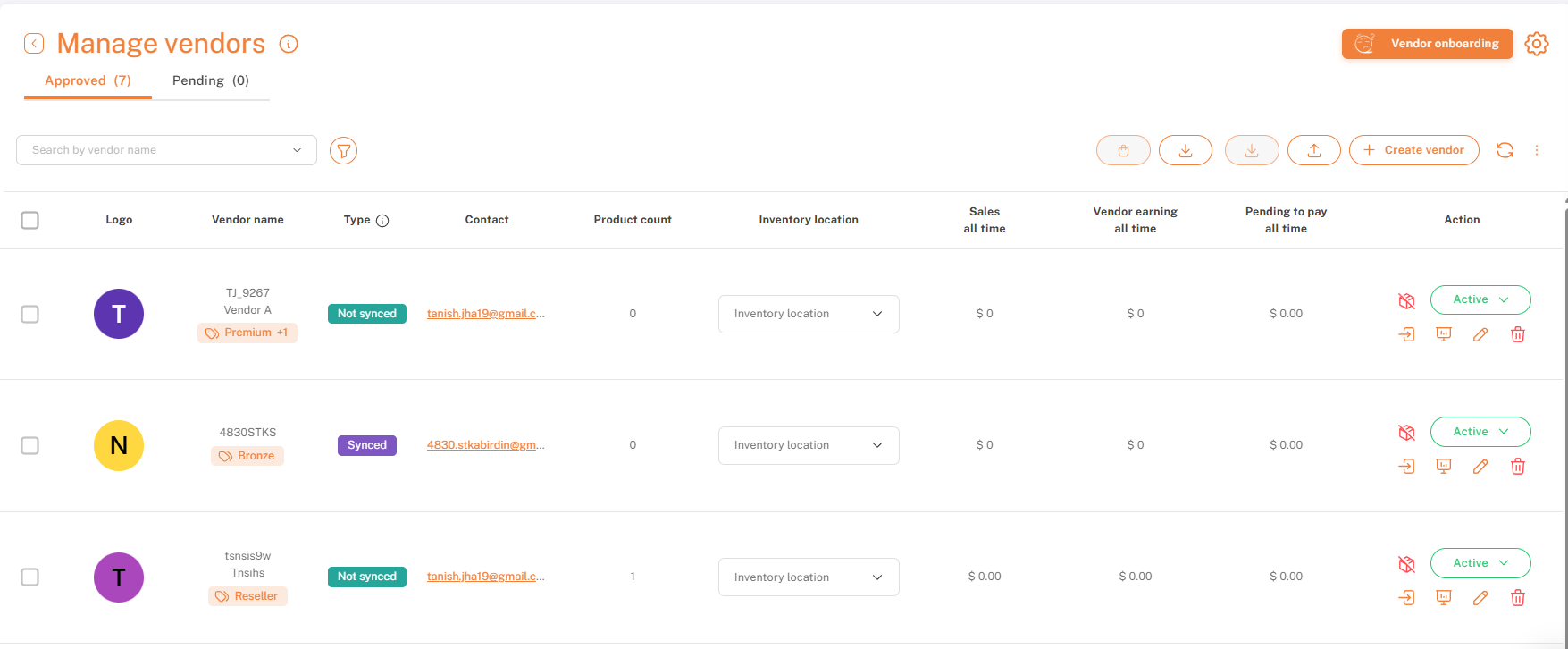
Tags appear under the vendor name on the Manage Vendors page
For merchants using the Vendor Subscription add-on: plans can now also be scoped to specific vendor tags, so only vendors carrying that tag see the plan, useful for regional plans, tiered cohorts, invite-only tiers, and similar use cases.
19 June 2026
VendorsCustom Fields for Vendor Company Information
Many marketplaces need vendor details beyond what Shipturtle captures by default, business registration numbers, regional identifiers, certifications, and other business-specific fields. Merchants can now add these as custom fields, capturing exactly the information their marketplace needs.
These fields can also be embedded directly on the registration form, so they're captured automatically at the time of vendor registration. (This remains applicable only to the iframe-based registration page, not the C2C flow.)
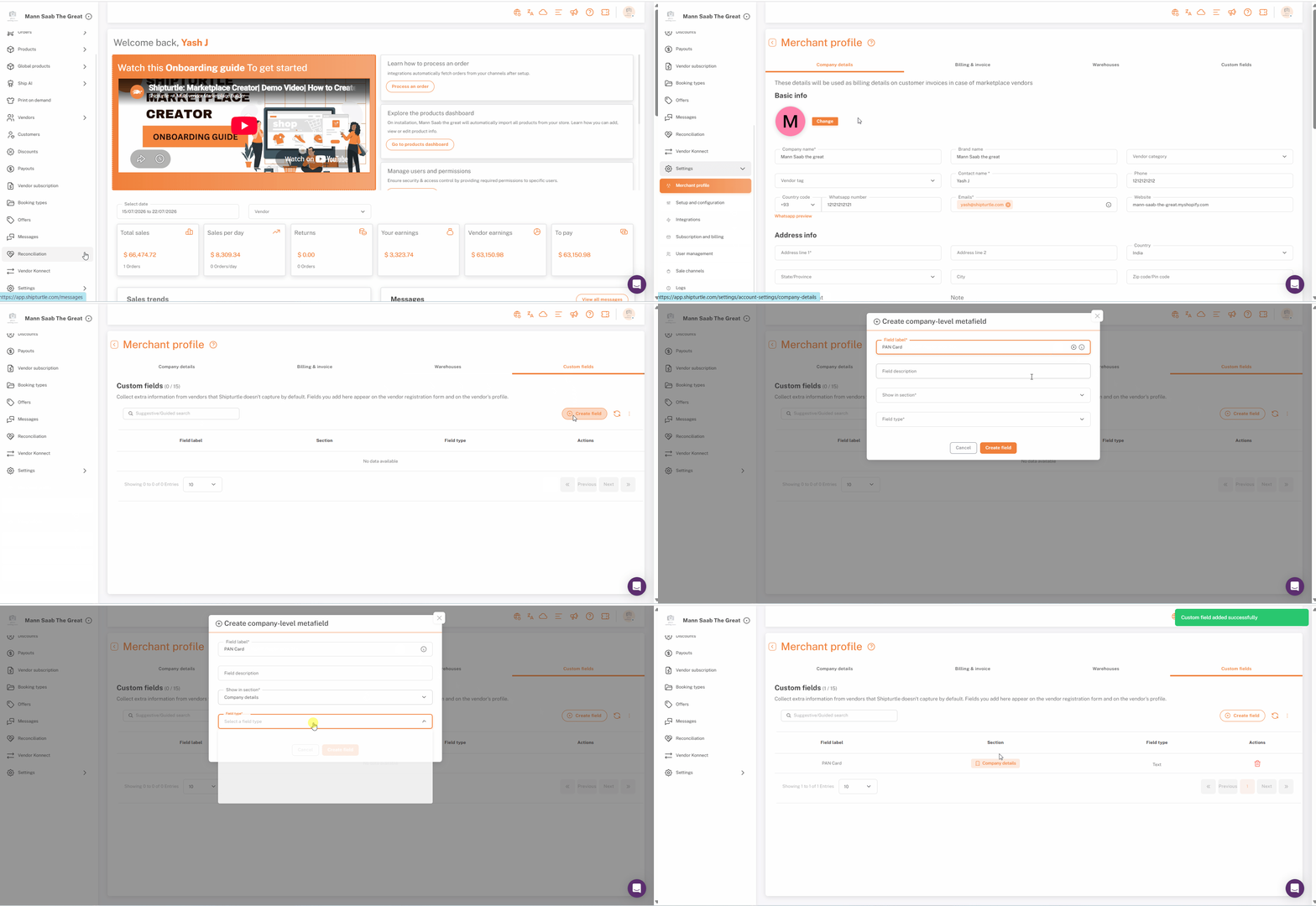
Create a custom field (e.g., PAN Number) under Merchant Profile → Custom Fields
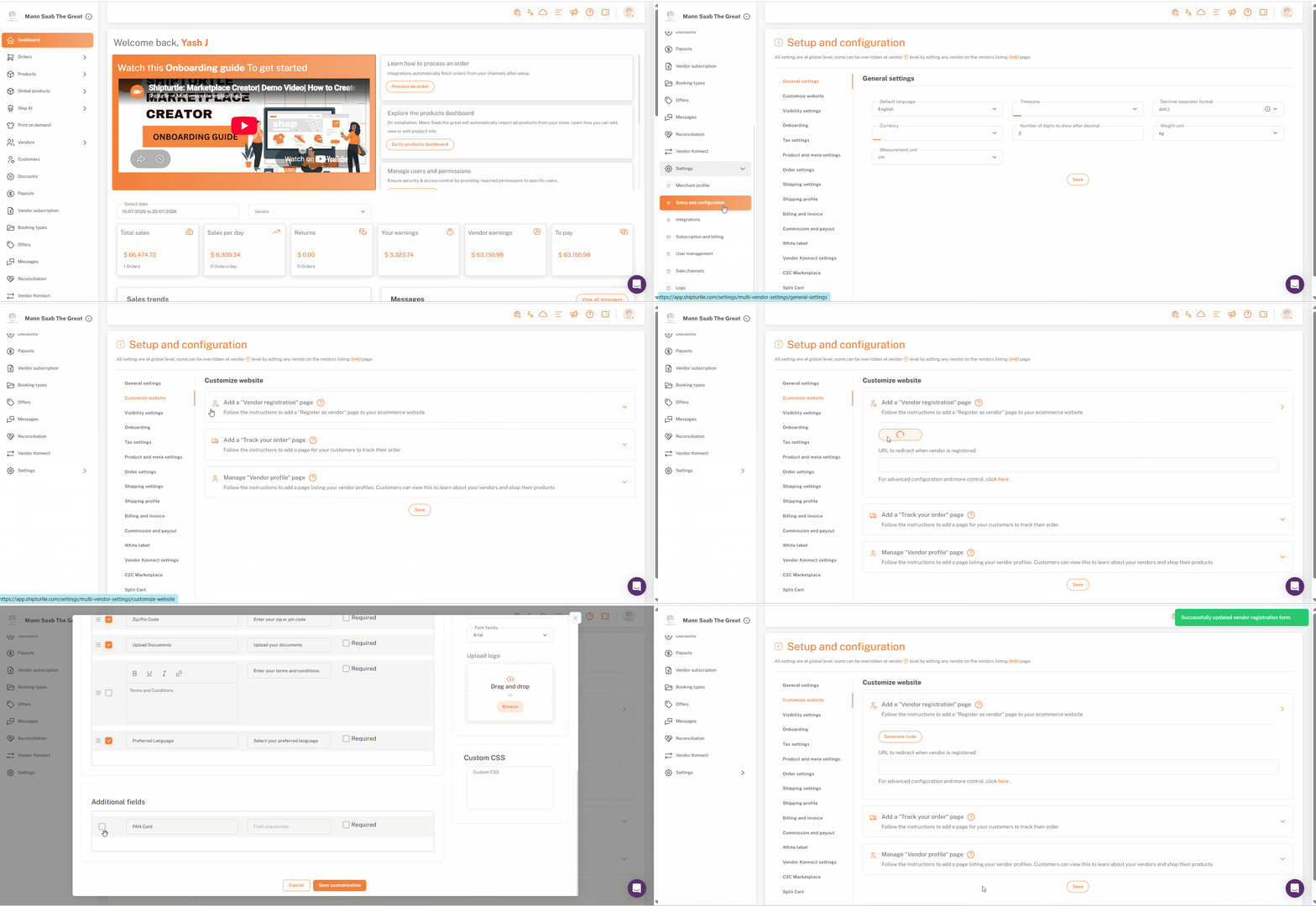
Include the custom field on the registration form via Customize Vendor Registration Form
19 June 2026
VendorsOTP-Based Vendor Registration
Vendor registration is now more secure, with email OTP verification added to the sign-up flow making it harder for bad actors to create fake vendor accounts. OTP verification applies to:
- The registration page embedded on your store (the iFrame code generated from Customize Website → Add a Vendor Registration Page → Generate code)
- The C2C vendor registration flow
By default, OTP verification is turned on. If a merchant needs to disable it, they can do so from Setup and Configuration → Onboarding → Advanced Settings.
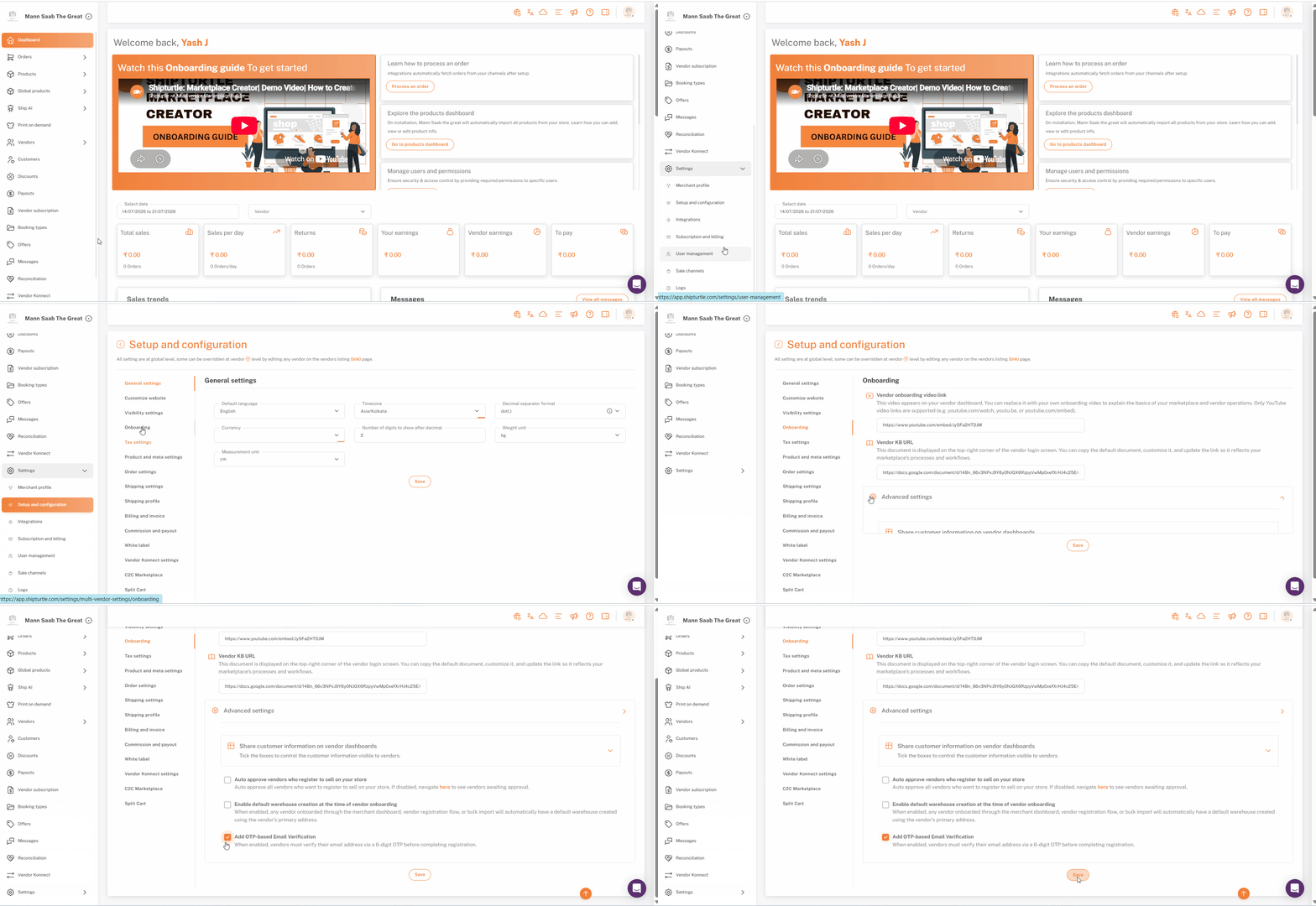
Enable/disable OTP-based email verification under Setup and Configuration → Onboarding