A quick guide to picking the right seller experience for your marketplace
⚡ Quick Summary
B2C suits professional sellers with many listings and orders who need advanced tools. C2C suits private or occasional sellers who want a simple, mobile-friendly dashboard inside your store. You can run both side by side, and add the MOQ add-on when sellers need buyers to order a minimum quantity.
Overview
Shipturtle supports both B2C (Business-to-Consumer) and C2C (Consumer-to-Consumer) marketplace models, each designed to serve different types of sellers and customer experiences. This article explains the differences, examples, and how Shipturtle's features align with each model.
In this guide, you'll learn:
- What B2C and C2C marketplaces are, with real-world examples.
- How the two seller interfaces compare at a glance.
- Which Shipturtle features support each model.
- How the MOQ add-on helps sellers who sell in bulk or packs.
- How to choose, or combine, the right model for your business.
1. What Is a B2C Marketplace?
B2C e-commerce involves transactions between a business seller and individual consumers.
- Businesses sell products or services directly to end customers.
- Sellers in B2C marketplaces are typically professional sellers with multiple listings, substantial order volumes, and dedicated teams.
Examples
- Amazon: One of the world's largest B2C marketplaces where brands and businesses sell directly to customers.
- AliExpress: The consumer-facing marketplace arm of Alibaba, connecting business sellers with global consumers.
2. What Is a C2C Marketplace?
C2C e-commerce (also called P2P, Peer-to-Peer) involves transactions between individual consumers without a business entity in between.
- Sellers are usually private individuals with few listings and smaller order volumes.
- This model focuses on enabling direct exchanges between people.
Examples
- eBay: A classic C2C marketplace where individuals sell products via auction or fixed-price listings.
- Airbnb: A C2C marketplace where homeowners rent their spaces directly to guests.
3. B2C vs C2C at a Glance
Here is how the two seller interfaces compare in Shipturtle:
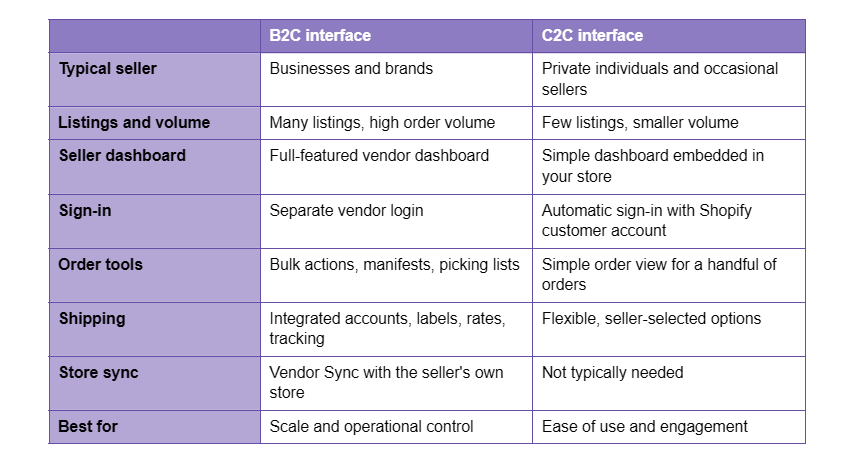
4. Choosing Between B2C and C2C in Shipturtle
Both models are supported by Shipturtle, and you can choose what suits your marketplace goals.
When to choose B2C
Choose the B2C marketplace model if:
- Your sellers are businesses with many listings and orders.
- You need advanced shipping and order management capabilities.
- You want features like vendor website sync, detailed analytics, and bulk actions.
B2C workflows are ideal for sellers who operate at scale and require advanced tools.
When to choose C2C
Choose the C2C marketplace model if:
- Your sellers are private individuals or occasional sellers.
- You want to host selling directly on your store without forcing sellers to go to a separate app.
- Simplicity, ease of use, and a minimal interface are important.
The C2C interface offers a simpler, mobile-friendly selling experience and keeps sellers engaged directly within your marketplace environment.
Hybrid flexibility
Shipturtle allows you to mix interfaces:
- You can continue using the B2C interface for professional sellers.
- Smaller or individual sellers can use the C2C dashboard.
- Both workflows can coexist, giving flexibility for different seller types.
To see every marketplace type Shipturtle supports, including B2B and hybrid setups, see Different types of marketplaces supported by Shipturtle.
5. Shipturtle Features for B2C (Professional Sellers)
Shipturtle's B2C marketplace setup offers features designed for business sellers:
Bulk order management
- Advanced tools for managing large order volumes.
- Change logs track edits by all users.
- Generate manifests, picking lists, and use powerful filters to process orders in bulk.
Advanced shipping features
- Integrate shipping accounts.
- Generate labels, fetch rates, and track shipments.
- Complete visibility into "Where Is My Order?" with real-time tracking.
Product fields and variants
- Extensive product attributes such as SKU, barcode, inventory tracking, cost price, and more.
- Ideal for sellers with diverse catalogs and variant-heavy products.
Vendor Sync
- Sync products and orders with sellers' own e-commerce sites using Vendor Store Connect.
- Expands reach and keeps inventory consistent.
Integrated inventory management
- Manage stock levels with accuracy.
- Supports sellers with large and diverse catalogs.
Advanced analytics and reporting
- Deep insights into sales trends and customer behavior.
- Essential for scaling professional seller businesses.
Third-party integrations
- Support for external tools like payment gateways, shipping solutions, and analytics services.
- Helps professional sellers use existing workflows.
6. Shipturtle Features for C2C (Private Sellers)
The C2C marketplace setup prioritizes simplicity, ease, and accessibility for individual sellers:
User-friendly interface
- A simplified and intuitive selling experience.
- Dashboard optimized for a minimal learning curve.
Embedded dashboard design
- The C2C dashboard is fully embedded into your marketplace website.
- No forced redirects or separate windows for sellers.
Mobile-first experience
- Optimized for mobile usability.
- Fast load times and easy navigation for sellers on the go.
Straight sign-in with Shopify
- Customers logged in to your Shopify store are automatically signed into the C2C seller dashboard.
- No separate login or password, reducing friction and drop-offs.
Easy listing process
- Streamlined listing workflow for quick item uploads.
- Custom fields can be added to suit industry-specific needs.
Personalized seller profiles
- Sellers can create unique profiles.
- Helps build trust and identity in peer-to-peer selling.
Direct communication
- Native messaging features to connect buyers and sellers.
- Encourages personal interactions and relationship building.
Flexible shipping options
- Sellers can select and manage shipping preferences.
- Offers flexibility tailored to individual selling patterns.
7. MOQ (Minimum Order Quantity) Add-On
The MOQ add-on lets you set the smallest quantity a buyer must order for a product. It is especially useful for business sellers who sell in bulk, by the case, or in packs, and for B2B or wholesale-style marketplaces.
Why use MOQ
- Protects seller margins: stops orders that are too small to be worth packing and shipping.
- Supports wholesale selling: lets vendors sell by the case, carton, or pack instead of single units.
- Raises average order value: buyers order in larger, more efficient quantities.
- Reduces cancellations: sellers are not forced to reject orders they can't fulfil profitably.
How it works for buyers
When a product has a minimum order quantity, the buyer must add at least that many units before they can complete checkout. If the quantity is too low, they are asked to increase it first.
Example
A coffee vendor sells bags in cases of 12. With an MOQ of 12, a buyer who adds 5 bags to the cart is prompted to raise the quantity to at least 12 before checking out.
Getting access
MOQ is an add-on. To enable it for your marketplace, redirect to the billing and Subscription > search for MOQ Add-on > activate it.
8. Choosing What's Right for Your Business
- Choose B2C: If you expect high-volume professional sellers and need robust operational tools.
- Choose C2C: If your marketplace focus is peer-to-peer transactions with ease and simplicity.
- Combine both: Use the C2C interface for casual sellers and the B2C tools for larger vendors.
- Add MOQ: If your business sellers sell in bulk, by the case, or wholesale.
Shipturtle's flexible configuration lets you adapt your marketplace model as your business evolves. You can mix and match workflows to serve diverse seller types under one platform.
FAQs & Troubleshooting
- Can I run B2C and C2C sellers on the same marketplace?
Yes. Professional sellers can use the B2C interface while individual sellers use the C2C dashboard, and both workflows run side by side. - Do I need a different Shipturtle plan for B2C or C2C?
No. The plan you need depends on the number of vendors and products, not the marketplace model. - Can I switch models later?
Yes. Shipturtle's configuration is flexible, so you can move sellers between workflows as your marketplace grows. Contact the support team if you'd like help planning the change. - Which sellers should use the MOQ add-on?
MOQ is best for business sellers who sell in bulk, by the case, or in fixed packs. It is rarely needed for private C2C sellers who list single items. - A buyer can't check out. Could MOQ be the reason?
Yes. If the product has a minimum order quantity and the cart holds fewer units, checkout is blocked until the buyer increases the quantity. Check the product's MOQ value if buyers report this.
Related Articles
- Different types of marketplaces supported by Shipturtle
- Building a C2C / P2P Marketplace with Shipturtle
- Marketplace vs Dropshipment
- Introduction to Vendor Store Connect
- Add vendors and grant dashboard access
Need Help?
If you're stuck, contact the Shipturtle support team at team@shipturtle.com or raise a support ticket through the Shipturtle support page.